CMake (no dependencies)
CMake project without third party dependencies can be used as is in Hunter. However you need to check that CMake code is correctly written and use best CMake practices.
Default behavior
Please check that your package respect (i.e. does not rewrite) such CMake variables like:
- CMAKE_INSTALL_PREFIX (critical)
- CMAKE_{C,CXX}_FLAGS + variations (critical)
- CMAKE_{C,CXX}_COMPILER + friends (critical)
- CMAKE_BUILD_TYPE (not critical, but recommended)
- CMAKE_CONFIGURATION_TYPES (not critical, but recommended)
- BUILD_SHARED_LIBS (not critical, but may result some errors)
Environment
Configuration of the package should be predictable.
For example it should not depend on the fact that some package already installed or not:
find_package(OpenSSL)
if(OPENSSL_FOUND)
  target_compile_definitions(... PUBLIC FOO_WITH_OPENSSL=1)
endif()
If package is optional then control behavior explicitly:
option(FOO_WITH_OPENSSL "Build with OpenSSL" ON)

if(FOO_WITH_OPENSSL)
  find_package(OpenSSL REQUIRED) # fatal error if not found!
  target_compile_definitions(... PUBLIC FOO_WITH_OPENSSL=1)
endif()
Same with the programs:
find_program(PYTHON_EXE python) # Use 'find_package(PythonInterp)' in real code
if(PYTHON_EXE)
  # generate some extra code
endif()
Use this code instead:
option(FOO_WITH_PYTHON "Build with Python" ON)

if(FOO_WITH_PYTHON)
  find_program(PYTHON_EXE python)
  if(NOT PYTHON_EXE)
    message(FATAL_ERROR "Python not found")
  endif()
endif()
Environment variable example:
if(EXISTS "$ENV{FOO_EXTRA_CODE}")
  # add some code
endif()
Solution:
option(FOO_WITH_EXTRA_CODE "Use extra code" ON)

if(FOO_WITH_EXTRA_CODE)
  if(NOT EXISTS "$ENV{FOO_EXTRA_CODE}")
    message(FATAL_ERROR "...")
  endif()
endif()
Note that this is kind of a natural limitation because otherwise Hunter have to save the whole outside environment like default paths, environment variables, etc. This is not doable on practice.
Exception is the variables related to compiler/toolchain like compiler version,
compiler id, platforms, generators, architectures: WIN32, IOS,
ANDROID, etc. Number of such traits is limited and forms
toolchain-id.
Install XXXConfig.cmake
The easiest way to integrate installed libraries into other project is to use
find_package
command. Project should generate and install *Config.cmake files instead
of using Find*.cmake modules. It’s the one of the painless ways to support
relocation - imported targets can be cached and downloaded as prebuilt binary
archive from build servers. Plus only imported targets works nicely with non
standard build types like MinSizeRel or RelWithDebInfo.
To check this feature you can try to install files to local directory. If result of installation looks like this:
Install the project...
/.../cmake -P cmake_install.cmake
-- Install configuration: "Release"
-- Installing: /.../lib/libhunter_box_1.a
-- Installing: /.../include/hunter_box_1.hpp
It means that this feature is missing and you need to patch CMake code to introduce it. Details can be found here.
Installation after fix:
Install the project...
/.../cmake -P cmake_install.cmake
-- Install configuration: "Release"
-- Installing: /.../lib/libhunter_box_1.a
-- Installing: /.../include/hunter_box_1.hpp
-- Installing: /.../lib/cmake/hunter_box_1/hunter_box_1Config.cmake
-- Installing: /.../lib/cmake/hunter_box_1/hunter_box_1ConfigVersion.cmake
-- Installing: /.../lib/cmake/hunter_box_1/hunter_box_1Targets.cmake
-- Installing: /.../lib/cmake/hunter_box_1/hunter_box_1Targets-release.cmake
CMake documentation
Add package to Hunter
Next let’s assume user hunterbox is trying to add hunter_box_1 project
to Hunter.
Examples on GitHub
Recommended name for the package is lowercase separated with underscore.
C++:
#include <hunter_box_1.hpp>

int main() {
  hunter_box_1::foo();
}
// file hunter_box_1.hpp

namespace hunter_box_1 {
} // namespace hunter_box_1
CMake with Hunter:
hunter_add_package(hunter_box_1)
find_package(hunter_box_1 CONFIG REQUIRED)
target_link_libraries(... hunter_box_1::hunter_box_1)
In Hunter sources:
cmake/projects/hunter_box_1/hunter.cmakefile with versionsexamples/hunter_box_1directory with example for testingdocs/packages/pkg/hunter_box_1.rstdocumentation for package
Git branches (will be covered in details later):
pkg.hunter_box_1branch for testingupload.hunter_box_1branch for uploadingpr.hunter_box_1work-in-progress branch for adding/updating package
Fork Hunter
Hunter hosted on GitHub service where common way to add code is to fork project and create pull request.
Fork ruslo/hunter, clone your fork and initialize all submodules:
> git clone https://github.com/hunterbox/hunter
> cd hunter
[hunter]> git submodule update --init --recursive .
Create branch to work on new package:
[hunter]> git checkout -b pr.hunter_box_1
Add versions
Add one or several versions of hunter_box_1 package to corresponding
hunter.cmake file.
Copy template and substitute all strings foo to hunter_box_1:
[hunter]> cp -r cmake/projects/foo cmake/projects/hunter_box_1
[hunter]> sed -i 's,foo,hunter_box_1,g' cmake/projects/hunter_box_1/hunter.cmake
Download release archive and calculate SHA1:
> wget https://github.com/hunterbox/hunter_box_1/archive/v1.0.0.tar.gz
> openssl sha1 v1.0.0.tar.gz
SHA1(v1.0.0.tar.gz)= c724e0f8a4ebc95cf7ba628b89b998b3b3c2697d
Add this information to cmake/projects/hunter_box_1/hunter.cmake file:
# !!! DO NOT PLACE HEADER GUARDS HERE !!!

include(hunter_add_version)
include(hunter_cacheable)
include(hunter_download)
include(hunter_pick_scheme)

hunter_add_version(
    PACKAGE_NAME
    hunter_box_1
    VERSION
    1.0.0
    URL
    "https://github.com/hunterbox/hunter_box_1/archive/v1.0.0.tar.gz"
    SHA1
    c724e0f8a4ebc95cf7ba628b89b998b3b3c2697d
)

hunter_pick_scheme(DEFAULT url_sha1_cmake)
hunter_cacheable(hunter_box_1)
hunter_download(PACKAGE_NAME hunter_box_1)
CMake options
Note that it does not make sense to build and install stuff like examples,
tests or documentation. Please check that your package has CMake options to
disable those. If such an option is not disabled by default use
hunter_cmake_args:
# bottom of cmake/projects/Foo/hunter.cmake

hunter_cmake_args(
    Foo
    CMAKE_ARGS
        FOO_BUILD_EXAMPLES=OFF
        FOO_BUILD_TESTS=OFF
        FOO_BUILD_DOCUMENTATION=OFF
)

hunter_pick_scheme(DEFAULT url_sha1_cmake)
hunter_download(PACKAGE_NAME Foo)
Options set by hunter_cmake_args have lower precedence than options set
by hunter_config(... CMAKE_ARGS ...) (see
order).
Build types
Warning
Usually there is no need to set a build type explicitly. If the package does not
work with default Debug + Release it means something is wrong with
the package itself.
Default build type(s) can be set by hunter_configuration_types:
hunter_configuration_types(Foo CONFIGURATION_TYPES Release)
hunter_download(PACKAGE_NAME Foo)
User can overwrite this default by using
custom
hunter_config parameters.
Set default version
Add hunter_config directive with default version to
cmake/configs/default.cmake:
hunter_config(hunter_box_1 VERSION 1.0.0)
Create example
To test the integration of the package into another project a simple example will be used. Copy the template example and substitute all stringsfoowithhunter_box_1:
[hunter]> cp -r examples/foo examples/hunter_box_1
[hunter]> sed -i 's,foo,hunter_box_1,g' examples/hunter_box_1/*
Tweak all files in examples/hunter_box_1 directory to fit headers and
names of imported targets.
Add documentation
Each package should have a page with information and usage example.
To create such a page copy the template file and substitute all strings foo with
the project name (for example hunter_box_1):
[hunter]> cp docs/packages/pkg/foo.rst docs/packages/pkg/hunter_box_1.rst
[hunter]> sed -i 's,foo,hunter_box_1,g' docs/packages/pkg/hunter_box_1.rst
Open file docs/packages/pkg/hunter_box_1.rst and tweak all entries.
Substitute unsorted with some tag in directive
.. index:: unsorted ; foo. This tag will be used on
this page.
See also
Note
Since you don’t know the pull request number a priori leave it as N for now.
You can update it later.
To locally check if the documentation is still building you can run:
[hunter]> cd docs
[hunter/docs]> source ./jenkins.sh
(_venv) [hunter/docs]> ./make.sh
Commit
Now save all changes by doing a commit:
[hunter]> git branch
  master
* pr.hunter_box_1

[hunter]> git add cmake/configs/default.cmake
[hunter]> git add cmake/projects/hunter_box_1/
[hunter]> git add docs/packages/pkg/hunter_box_1.rst
[hunter]> git add examples/hunter_box_1/

[hunter]> git commit -m "Add 'hunter_box_1' package"
Testing locally
This step is optional since we will run tests on the CI server. However it’s the fastest way to check that everything is ready and working correctly.
Script jenkins.py will package a temporary Hunter archive based on current
state and build the specified example. This script uses
Polly toolchains.
Check you have Python 3 installed, clone Polly and add its bin folder to
PATH environment variable:
> which python3
/usr/bin/python3

> git clone https://github.com/ruslo/polly
> cd polly
[polly]> export PATH="`pwd`/bin:$PATH"
Go back to Hunter repository and run test:
> cd hunter
[hunter]> which polly.py
/.../bin/polly.py
[hunter]> TOOLCHAIN=gcc PROJECT_DIR=examples/hunter_box_1 ./jenkins.py
CI testing
Now let’s run tests on continuous integration servers with various toolchains and platforms. Hunter uses AppVeyor to test for Windows (Visual Studio, NMake, Ninja, MinGW, MSYS) and Travis to test for Linux (GCC, Clang, Android, Clang Analyzer, Sanitize Address, Sanitize Leak) and for OSX (Clang + Makefile, Xcode, iOS).
Register your Hunter fork:
Branch master
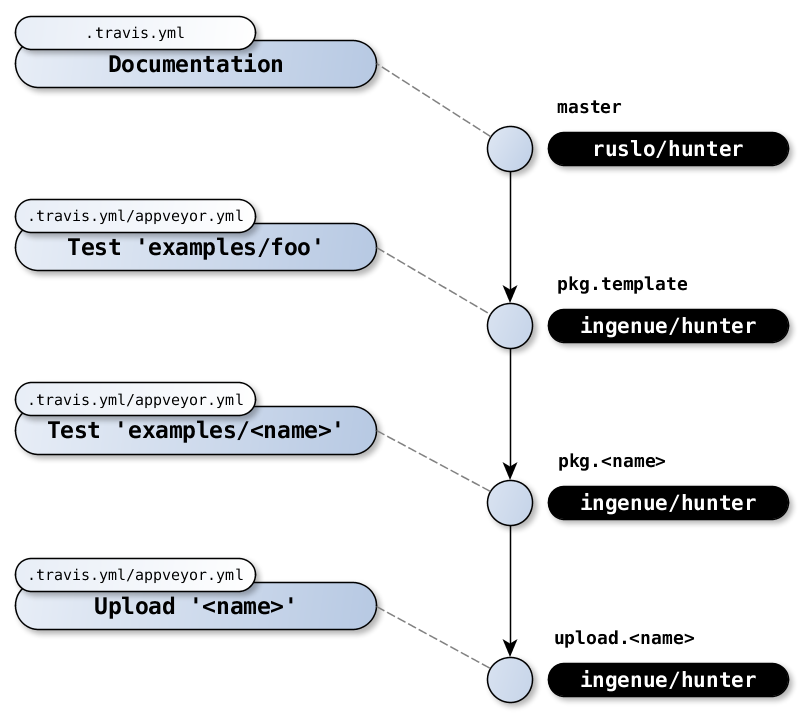
To understand what should be done next you need to understand the structure of branches.
- Name:
master - Repository: https://github.com/ruslo/hunter
- Testing: Documentation on Linux
In branch master there is only the .travis.yml file which will only check
if the documentation is building:
When you open a pull request to ruslo/hunter this test will automatically run.
Branch pkg.template
- Name:
pkg.template - Repository: https://github.com/ingenue/hunter
- Testing: Nothing
In branch pkg.template of the repository ingenue/hunter there are
the template files .travis.yml and appveyor.yml:
- https://github.com/ingenue/hunter/blob/pkg.template/.travis.yml
- https://github.com/ingenue/hunter/blob/pkg.template/appveyor.yml
All changes from master will go to pkg.template. The only differences
between master and pkg.template are the files .travis.yml/appveyor.yml.
Branch pkg.<name>
Branch for testing package <name>.
- Name:
pkg.<name> - Repository: https://github.com/ingenue/hunter
- Testing: Package
<name>on Windows/Linux/OSX hosts
Real testing happens in pkg.<name> branch of ingenue/hunter repository.
E.g. branch pkg.gtest:
- https://github.com/ingenue/hunter/tree/pkg.gtest
- AppVeyor https://ci.appveyor.com/project/ingenue/hunter/build/1.0.2352
- Travis https://travis-ci.org/ingenue/hunter/builds/274507515
All changes from pkg.template will go to pkg.<name> branch on updates.
The only differences between pkg.template and pkg.<name> are
the files travis.yml/appveyor.yml.
Branch upload.<name>
Branch for uploads.
- Name:
upload.<name> - Repository: https://github.com/ingenue/hunter
- Testing: Upload archives with binaries to cache-server
After successful tests on pkg.<name> the branch upload.<name> will do
uploads. E.g. branch upload.gtest:
- https://github.com/ingenue/hunter/tree/upload.gtest
- https://ci.appveyor.com/project/ingenue/hunter/build/1.0.2287
- https://travis-ci.org/ingenue/hunter/builds/270324624
All changes from pkg.<name> will go to upload.<name> branch on updates.
The only difference between upload.<name> and pkg.<name> is
the build command: jenkins.py vs. jenkins.py --upload.
Fetch CI configs
Since we are adding a new package we have to create new CI configs for it.
Fetch the branch pkg.template and substitute all foo strings with
hunter_box_1:
[hunter]> git remote add ci https://github.com/ingenue/hunter
[hunter]> git fetch ci
[hunter]> git checkout pkg.template
[hunter]> git checkout -b pr.pkg.hunter_box_1

[hunter]> sed -i 's,foo,hunter_box_1,g' .travis.yml
[hunter]> sed -i 's,foo,hunter_box_1,g' appveyor.yml

[hunter]> git add .travis.yml appveyor.yml
[hunter]> git commit -m "Test 'hunter_box_1' package"
Run remote tests
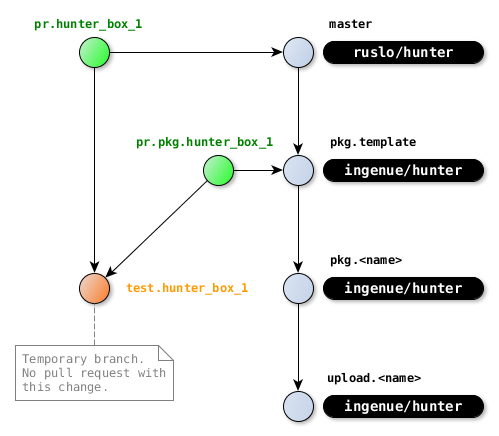
Currently we have two new branches:
pr.hunter_box_1contains new packagepr.pkg.hunter_box_1contains configs for testing
[hunter]> git branch -vv
  master
  pkg.template
  pr.hunter_box_1     9f60453 Add 'hunter_box_1' package
* pr.pkg.hunter_box_1 4a7626d Test 'hunter_box_1' package
To run tests we need to merge both changes into test.hunter_box_1
and push test.hunter_box_1 branch to remote:
[hunter]> git checkout pr.hunter_box_1
[hunter]> git checkout -b test.hunter_box_1
[hunter]> git merge pr.pkg.hunter_box_1
[hunter]> git push -u origin test.hunter_box_1
Example:
Excluding tests
If all tests passed you can skip this section.
If some toolchains are working and some toolchains failed it means the project has platform-specific problems. Note that you don’t have to have all toolchains working and there is no need to fix all issues you see. If at least something is working then you can exclude broken toolchains and you or somebody else can apply fixes later.
Please follow these guidelines when disabling toolchains:
- Do not remove toolchains from
.travis.yml/appveyor.ymlconfigs. Comment it out instead to simplify enabling it back. - Do not change the order of toolchains since it will affect
git merge. - Leave the link to broken job:
--- /home/docs/checkouts/readthedocs.org/user_builds/pol51-hunter/checkouts/latest/docs/creating-new/create/ci/.travis-OLD.yml
+++ /home/docs/checkouts/readthedocs.org/user_builds/pol51-hunter/checkouts/latest/docs/creating-new/create/ci/.travis-NEW.yml
@@ -54,8 +54,12 @@
       env: PROJECT_DIR=examples/hunter_box_1 TOOLCHAIN=libcxx
     - os: osx
       env: PROJECT_DIR=examples/hunter_box_1 TOOLCHAIN=osx-10-11
-    - os: osx
-      env: PROJECT_DIR=examples/hunter_box_1 TOOLCHAIN=ios-nocodesign-9-3
+
+    # FIXME: iOS is not supported by this package
+    # * https://travis-ci.org/hunterbox/hunter/jobs/276514722
+    # - os: osx
+    #   env: PROJECT_DIR=examples/hunter_box_1 TOOLCHAIN=ios-nocodesign-9-3
+
     # }

 install:
If no working toolchain is left for .travis.yml or appveyor.yml then
comment out everything and add TOOLCHAIN=dummy test.
Go to branch pr.pkg.hunter_box_1 with CI configs and commit this change
there:
[hunter]> git checkout pr.pkg.hunter_box_1
[hunter]> git add .travis.yml
[hunter]> git commit -m 'Exclude broken'
Go to testing branch test.hunter_box_1, merge updated CI configs and run
new CI tests by pushing commits to remote:
[hunter]> git checkout test.hunter_box_1
[hunter]> git merge pr.pkg.hunter_box_1
[hunter]> git push
Pull requests (tests)
First push pr.pkg.hunter_box_1 with CI configs:
[hunter]> git checkout pr.pkg.hunter_box_1
[hunter]> git push -u origin pr.pkg.hunter_box_1
Open pull request to ingenue/hunter repository, to pkg.template
branch:
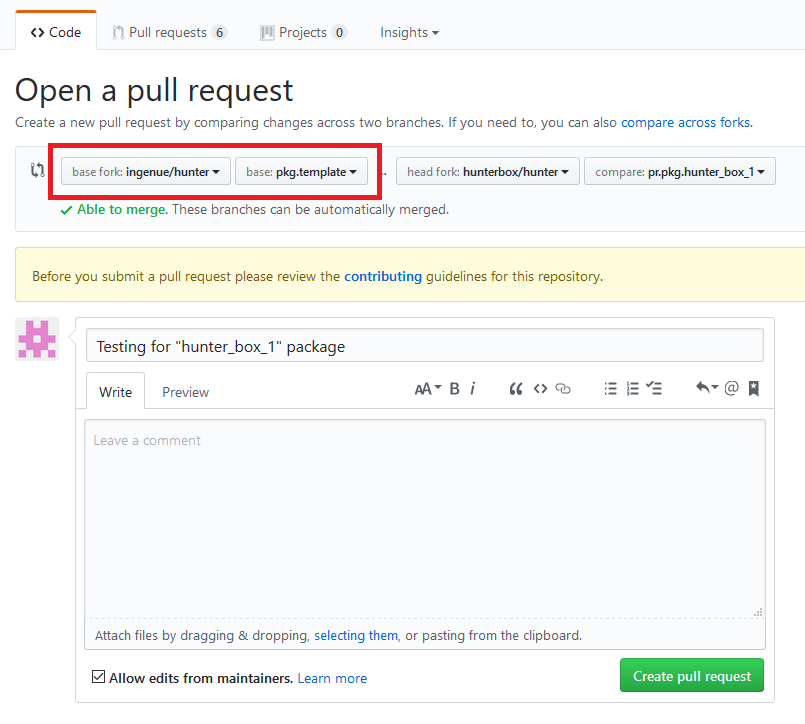
I will create pkg.hunter_box_1 and change branch before merging:
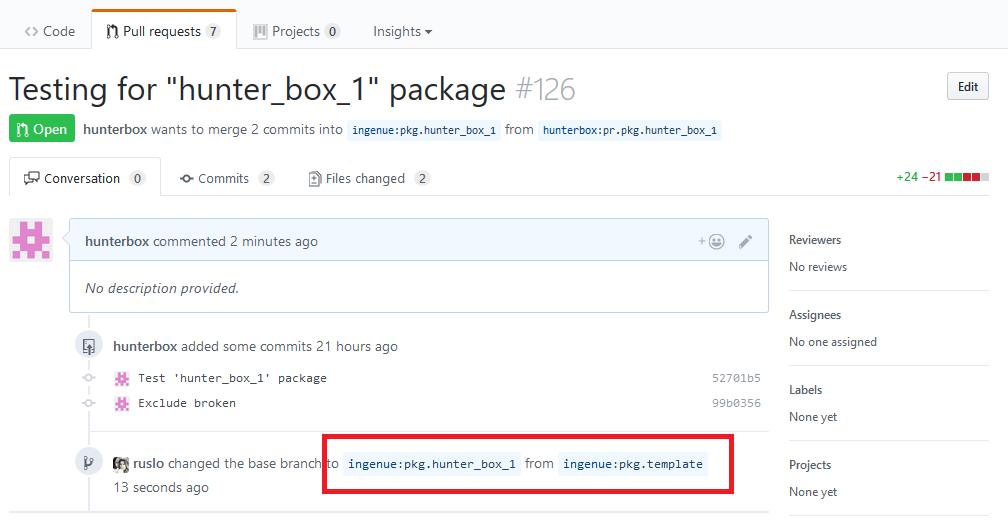
Pull requests
After CI configs merged you can open pull request with package itself:
[hunter]> git checkout pr.hunter_box_1
[hunter]> git push -u origin pr.hunter_box_1
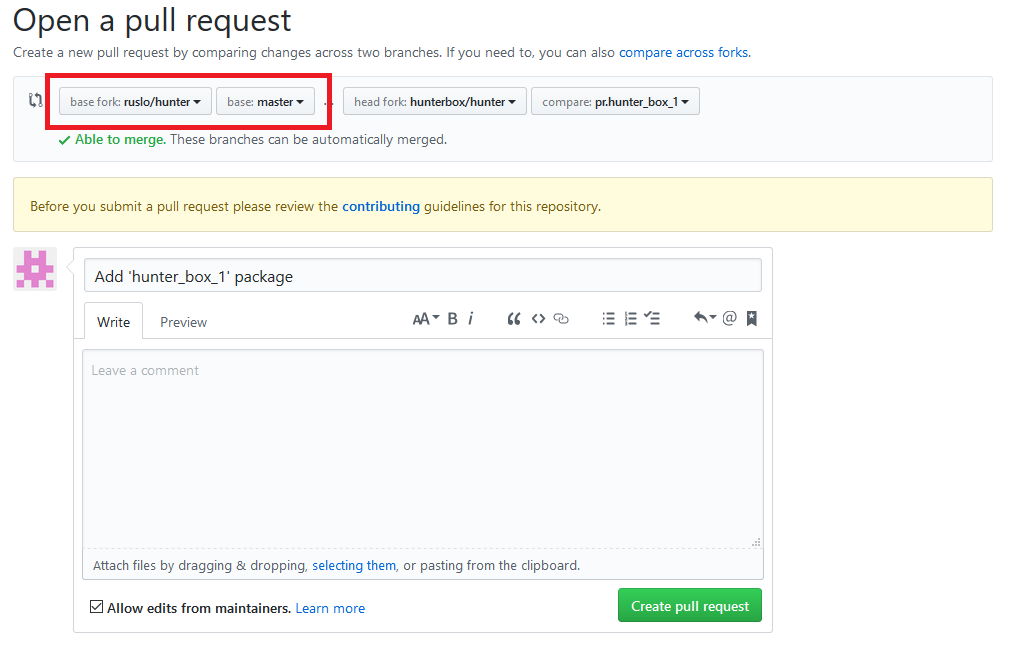
At this moment you know the pull request number:
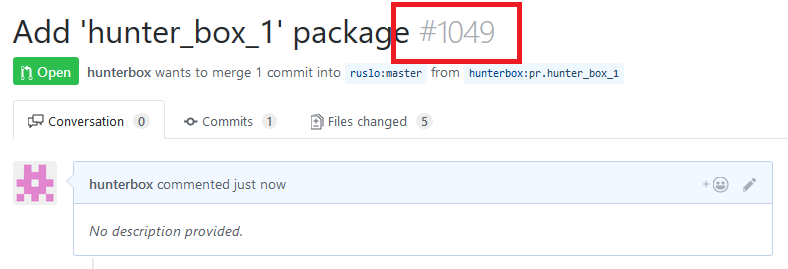
Add it to documentation:
[hunter]> git checkout pr.hunter_box_1
[hunter]> vim docs/packages/pkg/hunter_box_1.rst
[hunter]> git add docs/packages/pkg/hunter_box_1.rst
[hunter]> git commit -m 'Pull request number'
[hunter]> git push
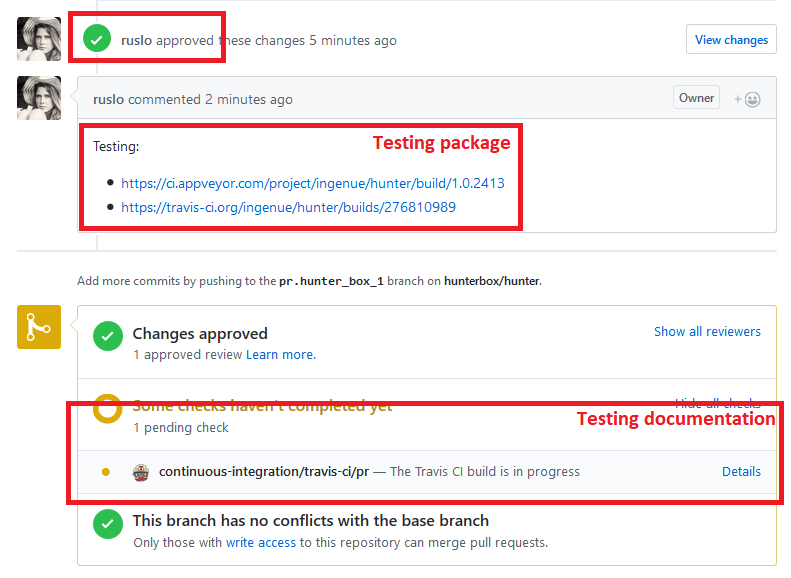
Pull request will be approved and tests run on CI, documentation will be tested automatically:
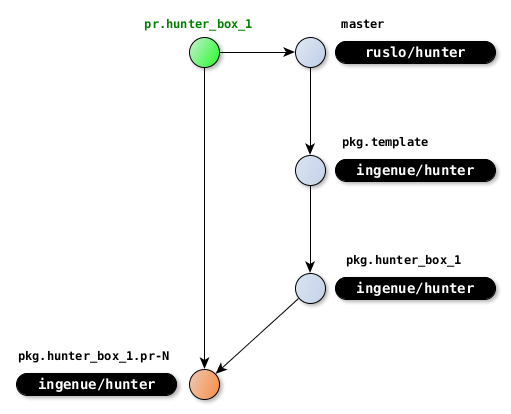
Branch pkg.hunter_box_1.pr-N will be created from pkg.hunter_box_1
to test package:
Upload
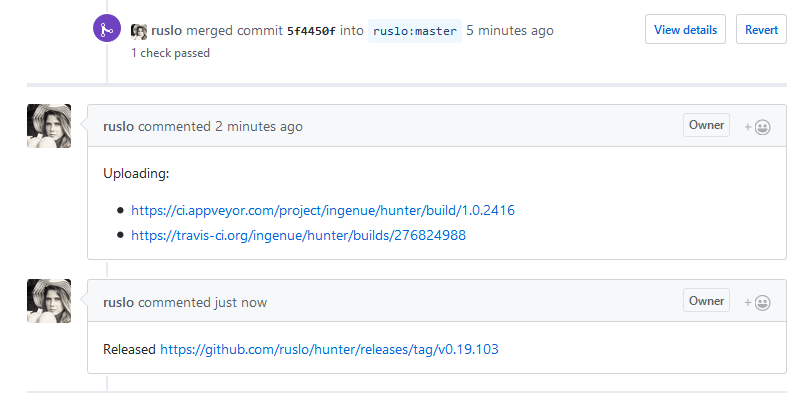
After all tests pass the pull request will be merged and upload run. When upload finished new release will be created:
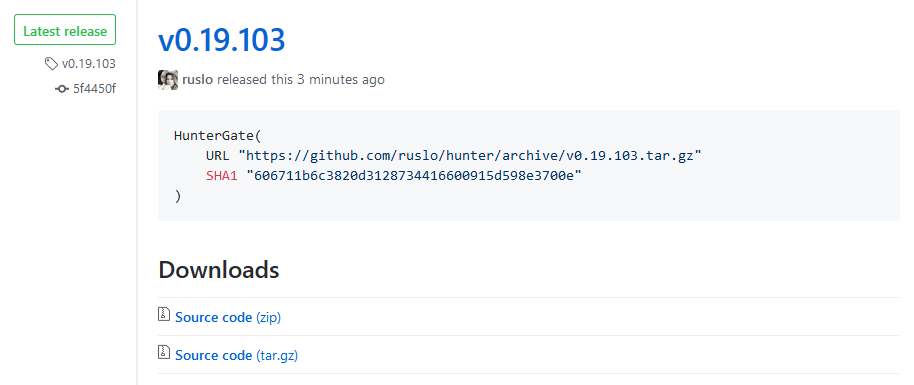
You can use new URL/SHA1:
Clean
At this moment all branches can be removed:
[hunter]> git checkout master

[hunter]> git push origin :pr.hunter_box_1
[hunter]> git push origin :pr.pkg.hunter_box_1
[hunter]> git push origin :test.hunter_box_1

[hunter]> git branch -D pr.hunter_box_1
[hunter]> git branch -D pr.pkg.hunter_box_1
[hunter]> git branch -D test.hunter_box_1